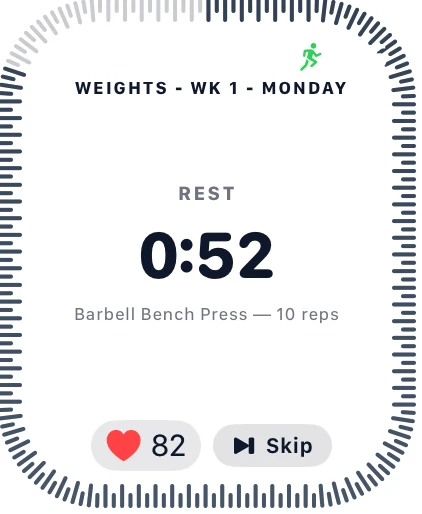
A fixed rest timer is always a guess. Set 90 seconds and some sets leave you still gasping when it hits zero; others have you sitting around fully recovered for the last 30. Heart-rate-adaptive rest in Joti replaces the guess with your actual heart rate — rest ends when you're actually recovered, not when an arbitrary number runs out.
What it actually does
There are two HR-adaptive modes, on top of the plain fixed-duration rest that's always been there:
- HR Extend. Your configured rest timer runs exactly as normal. If it hits zero and your heart rate is still above target, rest doesn't end — it keeps waiting until your heart rate drops under target (or a safety cap trips). If you've already recovered before the timer runs out, nothing changes; it behaves exactly like a normal fixed rest.
- HR Only. There's no fixed duration at all. Rest is gated purely by heart rate from the moment it starts, ending the instant you drop under target — capped at 5 minutes so a bad sensor reading can't strand you.
Neither mode decides whether you rest — that's still your normal rest-timer setting. They only change how that rest ends: a plain countdown, or a countdown plus (or replaced by) your actual recovery.
What "target" means
Both modes wait for your heart rate to drop under a target BPM. Joti can set this automatically — the boundary between the Fat Burn and Aerobic heart-rate zones (60% of your estimated max heart rate), meaning "you're no longer working hard" rather than a full resting-heart-rate recovery. The automatic target needs your birthdate on file to estimate max heart rate; without one, you'll need to enter a target manually (40–220 bpm), which you can also do any time to override the automatic number.
What you need to use it
HR-adaptive rest needs a live, continuously-updating heart rate during the rest period itself — not the after-the-fact heart rate reading Joti already shows on your session summary. Right now, the only source that can supply that live signal is a paired Apple Watch running the Joti watch app, which is what actually watches your heart rate against the target and ends the rest the instant you drop under it — the phone can't reliably do this itself while your screen is off or locked. That means:
- iOS only — there's no Android equivalent yet.
- A paired Apple Watch with the Joti watch app installed. An iPhone with no Watch paired has no live heart-rate source to gate against.
Without both of those, Joti hides HR Extend and HR Only from the picker entirely rather than offering a setting that can't do anything — you'll only see the plain, always-available "None" option, which is the exact fixed-timer behaviour Joti has always had.
Setting it up
There are two places to configure it:
- Preferences sets your global default rest mode and target BPM, applied to every exercise unless overridden.
- Per exercise, in the workout builder, you can override that default — Inherit default, HR Extend, or HR Only — exercise by exercise. Handy if you only want, say, your interval cardio work gated by heart rate while your strength sets stay on a plain fixed timer.
What you'll see mid-session
Once a rest period actually goes into HR-gated waiting — past HR Extend's fixed duration, or from the start on HR Only — a small pulsing heart icon appears next to the rest timer with a down arrow and your target BPM, so you know exactly what number you're waiting to drop under, not just that you're waiting. If your heart rate never drops under target (a stray reading, a watch that stops relaying), the safety cap ends the rest for you automatically — the wait can never run open-ended.
Try it
If you train with an Apple Watch, HR-adaptive rest turns your rest timer from a guess into something that actually tracks your recovery. Set a default in Preferences, or turn it on for just the exercises where recovery time genuinely varies session to session. Joti is free to download, with a free first month to try it out.
Frequently asked questions
What is heart-rate-adaptive rest in Joti?
A way of ending a rest period based on your actual heart rate recovering, instead of a fixed number of seconds. HR Extend runs your normal rest timer and then keeps waiting past it if your heart rate is still above target; HR Only skips the fixed duration entirely and waits purely for your heart rate to drop under target.
What do I need to use HR-adaptive rest?
A paired Apple Watch with the Joti watch app installed. It's iOS only for now — Android has no equivalent yet, and an iPhone with no Watch paired has no live heart-rate source to gate against. Without both, Joti only offers the plain fixed-timer "None" option.
How does Joti pick my target heart rate?
By default it uses 60% of your estimated max heart rate — the boundary between the Fat Burn and Aerobic zones — calculated from your birthdate. You can override it with your own target (40–220 bpm) any time, and it's required manually if you don't have a birthdate on file.
What happens if my heart rate never drops under target?
A safety cap ends the rest for you regardless — up to 5 minutes for HR Only, or roughly double your configured rest (minimum 60 seconds) of extra waiting for HR Extend. HR-gated rest can never run open-ended.
Can I use HR-adaptive rest on just some exercises?
Yes — set a global default in Preferences, then override it per exercise in the workout builder (Inherit default, HR Extend, or HR Only). Useful if you only want interval-style cardio gated by heart rate while your strength sets stay on a plain fixed timer.